Dataset Catalog
Transition to the Dataset Catalog
The transition to the catalog of datasets registered in the system is done through the "Data" page, available in the navigation system.
Dataset catalog page:
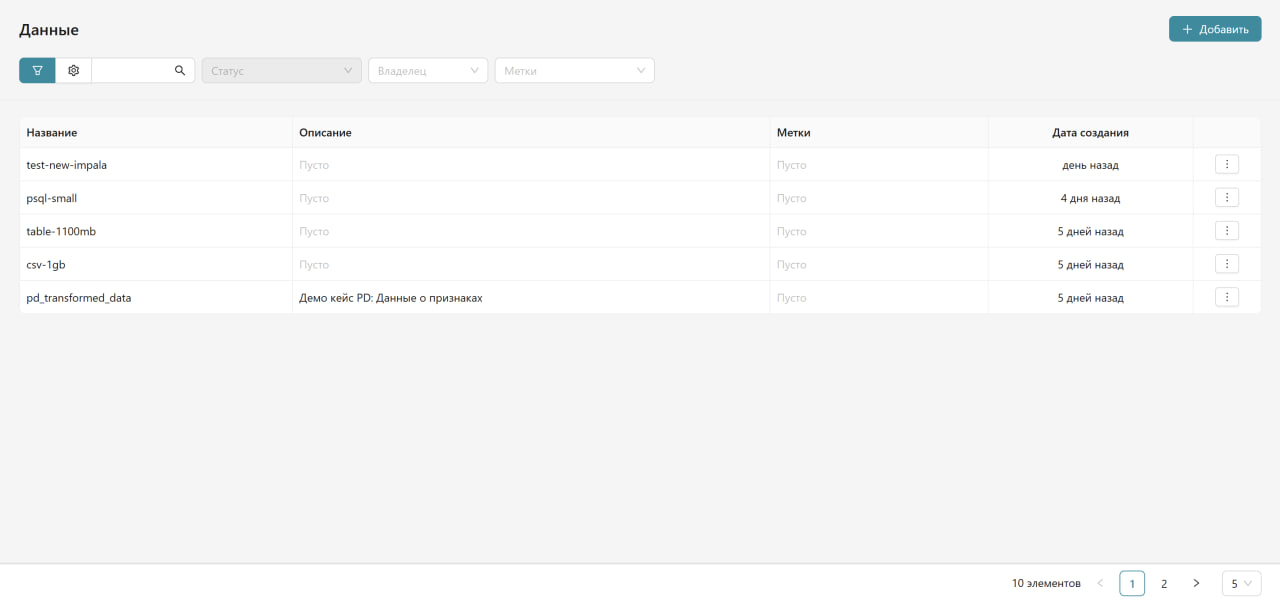
Information Displayed in the Catalog
| Column | Description |
|---|---|
| Name | The name of the dataset in the system. The parameter name of the form Transformation_Name(dataset_name) indicates that the dataset contains columns obtained by transforming another dataset. |
| Description | Detailed information about the content and purpose of the dataset. |
| Tags | Tags characterizing the type of data and its purpose (e.g., pd_validation, promo_metrics). |
| Creation Date | When the dataset was registered in the system. |
| Action Menu | Available by clicking on the three dots on the right side of the row. |
Catalog Management
Catalog Management Toolbar
- Filters - allow filtering transformations by various parameters:
- Status - filtering by the current state of the transformation.
- All - additional filtering options.
- Tags - filtering by assigned tags.
- Owner - searching by owner.
- Search - search bar for quick transformation searches.
- Display Settings - button to customize the appearance of the table.
By default, datasets in the catalog are sorted by registration date in the system - from newest to oldest.
To search for a dataset, enter a substring in the search field and press Enter or the magnifying glass icon.
Case sensitivity does not matter; the search occurs by the names of the datasets,
the name, description, key of their corresponding data sources, as well as tags.
The catalog may contain more than one page. Page navigation buttons,
as well as a button to set the number of objects per page, are available
in the lower right corner of the screen form.
Viewing and Creating Objects
To add a new dataset, click the "Add" button in the upper right corner of the dataset catalog window.
To view information about a dataset or perform other actions, click on the three dots on the right side of the corresponding dataset row.
For more information on registering new datasets, see the section "Registering a New Dataset".