Predicate - Project Comparison
General Description
The transition to the project comparison page is done through the navigation path: Extensions > Project Comparison.
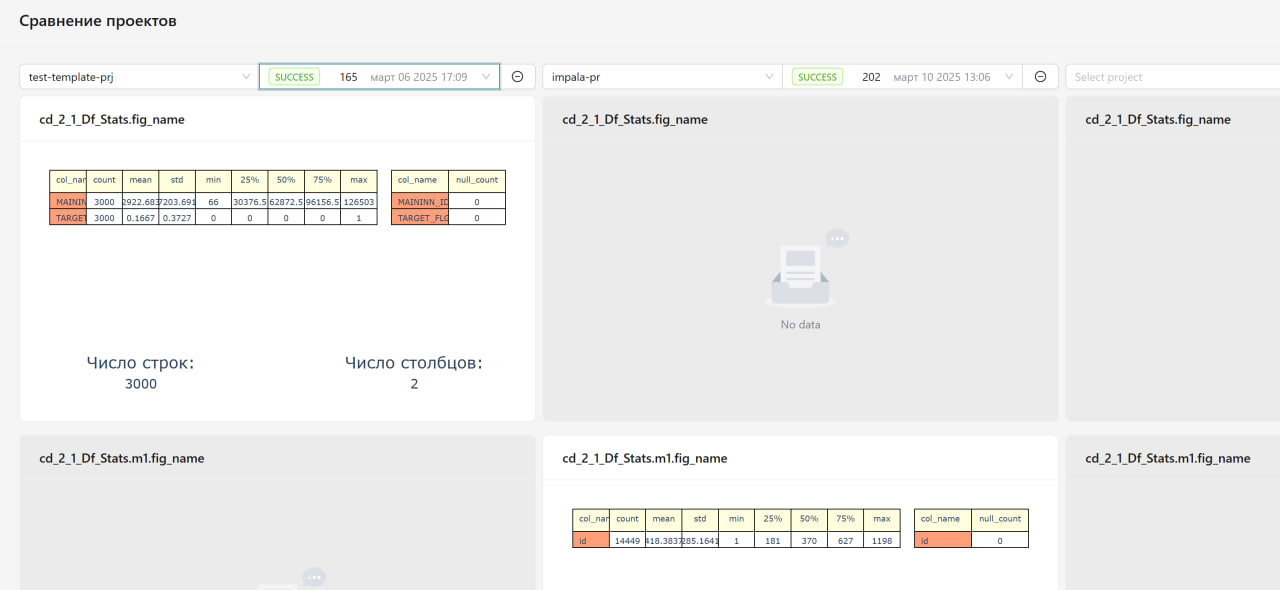
The "Project Comparison" page is designed for comparing metrics and results of various projects and their runs in the Predicate system. This tool allows for visual analysis and comparison of the performance characteristics of different projects, helping to identify operational features and assess effectiveness.
Project comparison page:
Key Functional Capabilities
Selecting Projects for Comparison
- Project Selection: the ability to select up to three projects from a dropdown list of available projects
- Run Selection: for each project, a specific run can be selected by its number and execution date
- Run Status: display of the status of the selected run (SUCCESS, ERROR, etc.)
Visual Comparison of Results
After selecting projects and their specific runs, the system displays all available metrics in parallel columns. The data is presented in tables for each selected project and run. If there is no data for any project, a "No data" notification is displayed.
Analysis Functionality
The tool provides comparison of data structure, value distribution, and other characteristics between different projects or between various runs of a single project. The functionality supports analysis of change dynamics and detection of anomalies in project data.