Project Traffic Light
Project Traffic Light is calculated based on the values and color signals of the project's scalar metrics.
The values that the project traffic light can take are: GREEN, YELLOW, RED.
A project may not have a traffic light.
The value (color) of the project traffic light is determined according to the rule that the user creates. The rule defines the logic for transforming the set of values and/or color signals of the project's scalar metrics into a final signal (red/yellow/green).
Example of a rule for calculating the project traffic light
If all scalar metrics of the project are "green", then green; otherwise, if all are "not red", then yellow; otherwise - red.
The set of scalar metrics of the project involved in calculating the traffic light, their aliases, and the calculation rule are specified during Creating a Monitoring Project.
The value of the project traffic light is displayed in the Project Catalog and corresponds to the result of the last project run.
The value of the traffic light can change from run to run of the project, thus reflecting changes in the monitored metrics.
How to Write a Rule
Rule Creation Form
After creating all nodes and edges of the project, expand the settings, and select the Traffic Light List field, after which the following form will open:
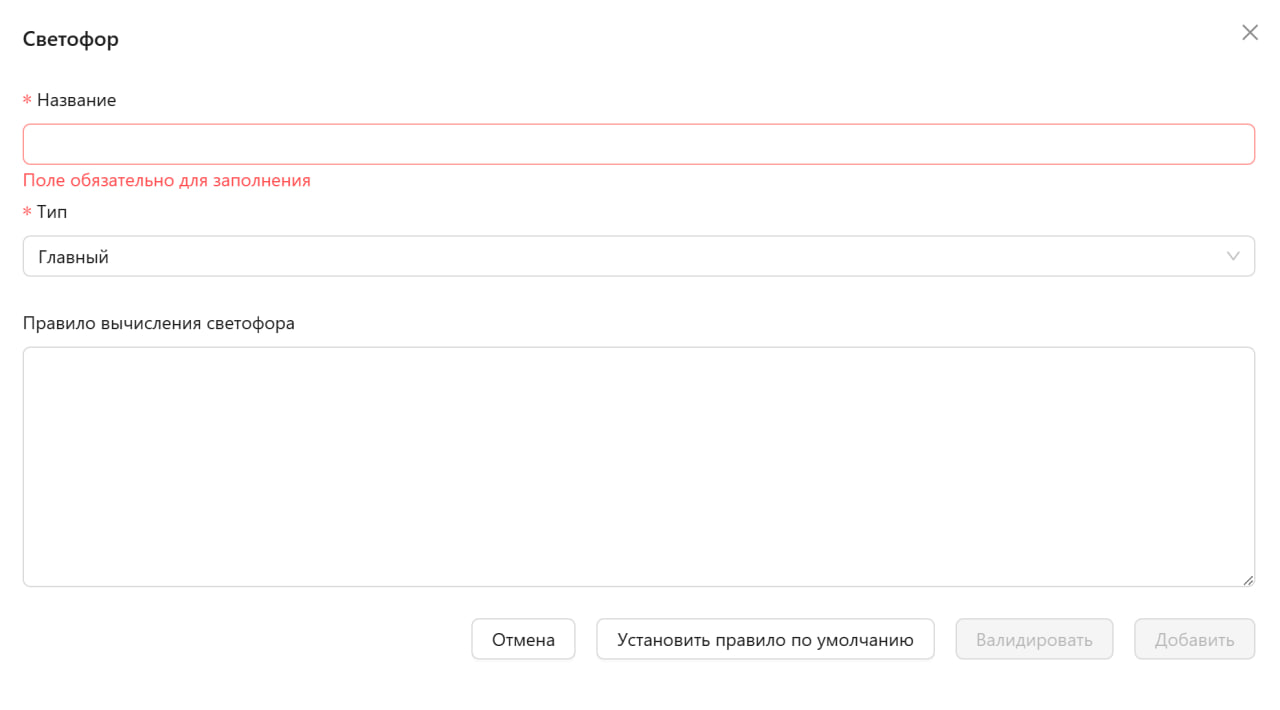
In this form, you can configure the traffic light for your project. The form contains the following fields:
- Name (mandatory field) - enter a name for the traffic light
- Type (mandatory field) - select the type of traffic light from the dropdown list (Main or Additional)
- Traffic Light Calculation Rule - a large text field for entering the rule that will determine the state of the traffic light
At the bottom of the form, there are buttons:
- Cancel - closes the form without saving
- Set Default Rule - fills the rule field with a standard template
- Validate - checks the correctness of the entered rule
- Add - saves the traffic light settings
Metric Values
You can refer to both the numerical value of the metric and the value of the simple traffic light of the metric (signal color).
To refer to the value of the metric, you need to use the method scalar(...), parameterized by the alias of the metric.
To refer to the color of the signal of the metric, you need to use the method signal(...), parameterized by the alias of the metric.
Example
There is a metric with the alias MAE.
To refer to the value, you need to write scalar(MAE).
To refer to the color of the simple traffic light, you need to write signal(MAE).
Rule Syntax
Expression Structure
If condition then action [elif condition then action] else action
The condition can be a regular logical expression with parentheses, and/or, comparisons >,<,==,!=
and references to metric values (signal(...)/scalar(...)).
The action can be a result or another if-expression, each if-expression (including the initial one) can contain as many (including 0) elif and must close with else.
The result, which is the project traffic light,
can be specified as result = GREEN, result = YELLOW, result = RED.
Rule Examples
Simple Example
Available metric aliases: MAE, MEAN
if signal(MAE) == GREEN and scalar(MEAN) > 0
    then result = GREEN
else result = RED
Complex Example
Available metric aliases: MAE, MSE, MEAN
if signal(MAE) == GREEN or (signal(MSE) == GREEN and signal(MEAN) == GREEN)
    then
        if scalar(MSE) < 10
            then result = GREEN
        elif signal(MSE) == YELLOW
            then result = YELLOW
        else result = RED
else result = RED