Predicate - Calendar
General Description
Navigation to the calendar page is done through the navigation path: Extensions > Calendar.
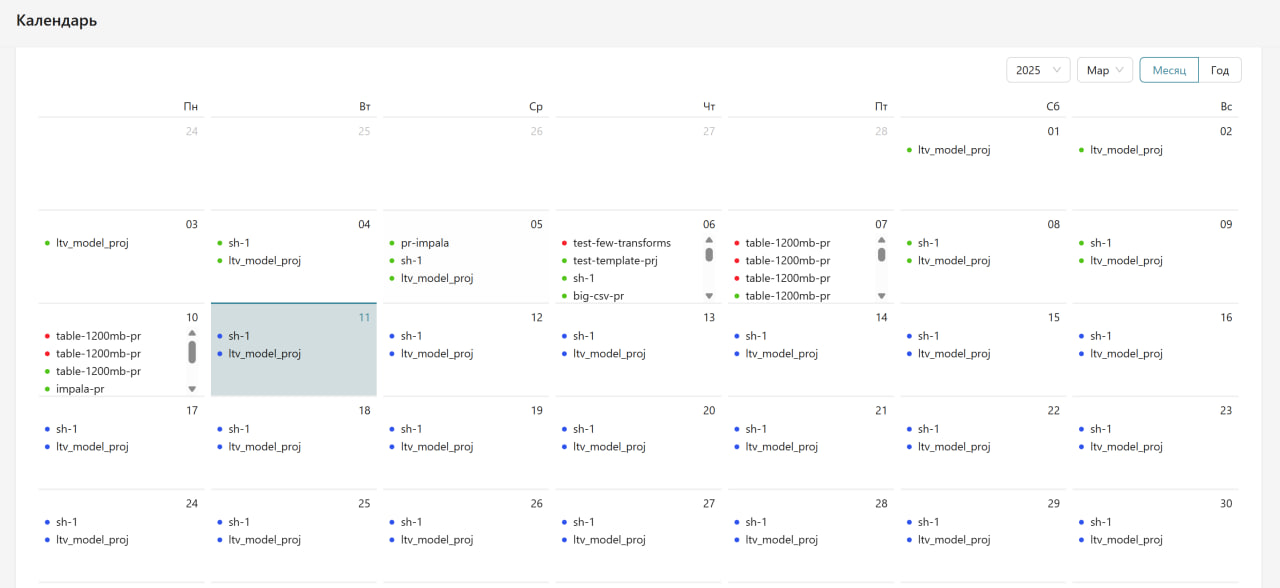
The "Calendar" page is designed for the visual display of scheduled and completed tasks in the Predicate system. The calendar allows tracking the status of project launches, planning new launches, and analyzing the history of task execution.
Calendar page:
Key Functional Capabilities
Calendar Navigation
- Year Selection: the ability to switch between years to view tasks
- View Selection: switching between "Month" and "Year" display modes
- Period Selection: the ability to select a specific month or date range
Color Indication of Task Status
- Green Color: successfully completed project launches
- Blue Color: scheduled launches awaiting execution
- Red Color: launches that ended with errors
Task Information
- The calendar displays project names for each day
- If there are multiple tasks on one day, they are displayed in a list
- The system shows both historical data on completed tasks and scheduled future launches
Detailed View and Navigation to Tasks
By selecting a specific day in the calendar, the user gains access to detailed information about launches scheduled or completed on that day. The exact time of execution for each launch is displayed. The system also provides the ability to navigate to detailed information about a specific project run directly from the calendar, simplifying access to task execution details without the need to navigate through other sections of the system.